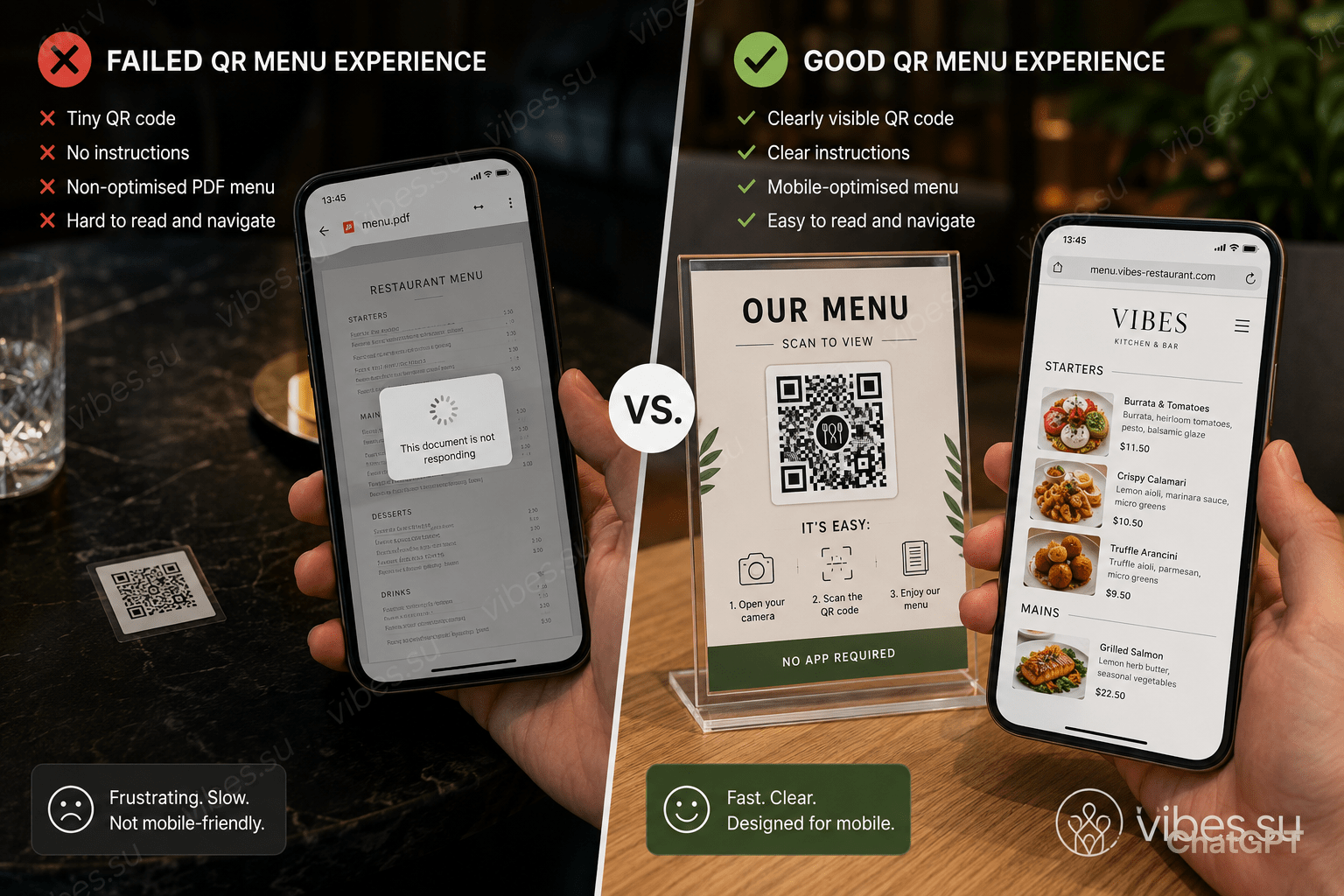
The 2020 QR menu boom created a user experience disaster. Two years later, restaurants that got it right share what they learned about placement, mobile optimisation, and guest psychology.
When the pandemic forced restaurants to ditch physical menus, owners rushed to print QR codes on anything that would hold ink. Stickers on tables, laminated cards clipped to napkin holders, codes taped to windows. The problem was not the technology. It was the complete absence of user experience thinking.
The three ways QR menus failed
First: terrible placement. Codes printed on glossy paper reflected ceiling lights and became unscannable. Codes placed flat on tables forced guests to stand up and hover awkwardly. Second: the destination was never mobile-optimised. Scanning a code and landing on a desktop PDF that required pinch-zoom and horizontal scrolling killed the experience before the guest saw a single dish. Third: zero instructions. Older guests did not know whether they needed an app, whether their phone camera was enough, or what to do if the code did nothing.
What the smart restaurants did differently
Restaurants that kept QR menus after restrictions lifted rethought the entire flow. The QR code itself became a designed object — not a pixelated afterthought, but a branded stand placed at eye level when seated. The destination was a lightweight page that loaded in under two seconds, with large touch-friendly buttons and the menu organised by course. Some added a language toggle. Some added allergen filters. The best ones added a «call waiter» button so guests were never stranded with technology.
The psychology of the scan
Guests arrive hungry and slightly impatient. Every friction point between sitting down and ordering costs the restaurant money. A QR code that takes five seconds to scan is not five seconds — it is five seconds of doubt about whether this restaurant has its act together. Restaurants that printed short instructions below the code («Open camera, point here, tap link») eliminated the confusion. Those that used dynamic QR codes could update the menu remotely without reprinting anything.
Dynamic QR codes versus static
A static QR code has the URL baked in — change the menu and you reprint everything. A dynamic QR code points to a redirect that you control. Change the destination anytime without touching the physical code. Restaurants that switched to dynamic codes saved printing costs within the first menu update and gained the ability to run A/B tests on menu layouts during different dayparts.
The unexpected retention win
Restaurants that paired QR ordering with a lightweight profile system — just name and phone — built remarketing lists without loyalty cards. A guest scans, orders, and automatically becomes reachable for «we miss you» promotions. One mid-size chain reported that QR-acquired contacts had a 22% higher return rate than walk-ins because the follow-up was immediate and contextual.